
Choosing a Flow for the Web SDK
This document is a mandatory pre-read for the web Connect SDK integration.
Choose a flow
We currently offer two flows on the web - popup based and redirect based. The popup-based flow is a significant improvement in the user experience over the redirect-flow, which is the existing market norm.
Popup | Redirect |
|---|---|
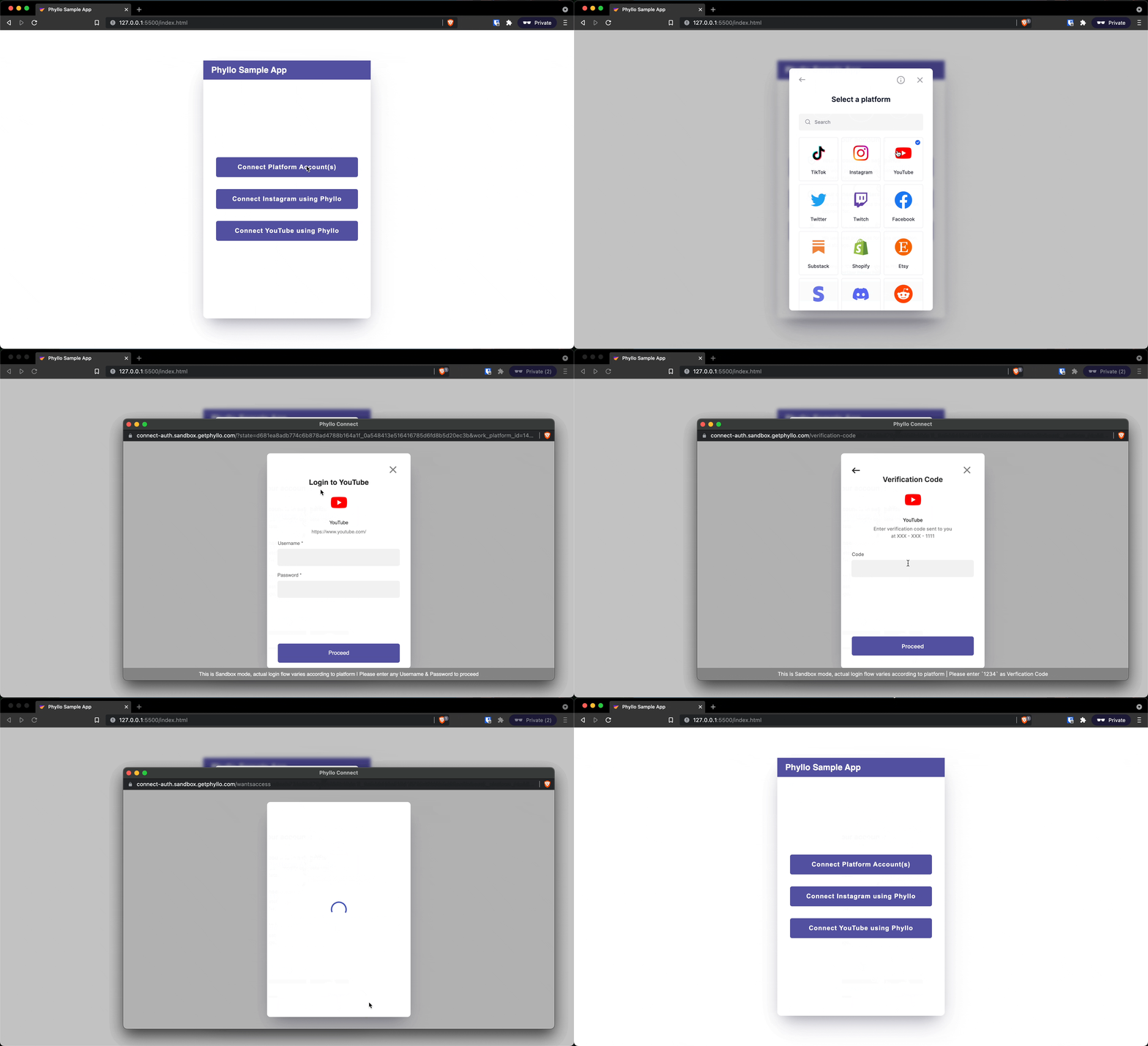
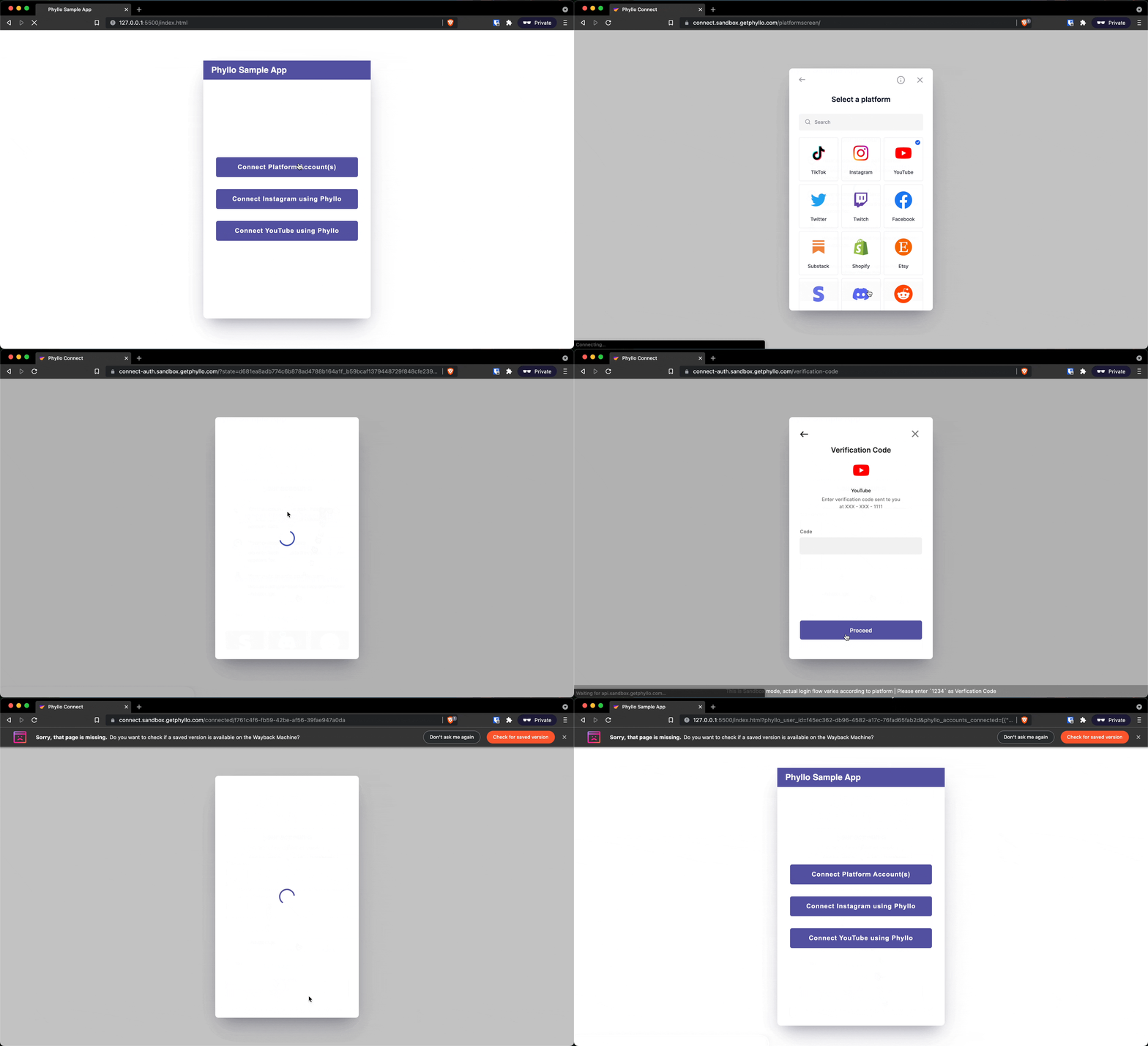
When you use this, the user stays on the same page (which is the developer's page - your page!) where the Connect SDK opens on the foreground and the platform page opens in a popup window. We will post the connection results via JavaScript event handlers. | When you use this, the user gets redirected to Connect SDK and then to the platforms, and finally the URL specified by you. We will post the connection results on the redirect URL as query params. |
We are unable to support the popup flow of web Connect SDK via in-app browsing experience. If this forms a large part of your use case or customer experience, you may want to switch to redirect flow or use a smart combination of popup and redirect (as fallback).
User experience for the popup flow
User experience for the redirect flow
Advantages of popup flow
The Connect SDK opens in a fullscreen modal on your web page, which means the URL that the creator sees is still your URL. This helps build trust.
The SDK opens in an HTML iframe which restricts cross-domain communication. This means only a SDK-controlled JS can interact with the iframe, thereby reducing security risks.
The platform authentication and permission pages open in a secure browser popup (or a new tab) in the foreground, which means your web page which contains the SDK is still open and active in the background. This helps you maintain application “state” much more easily as compared to a redirect-based flow.
Creators can easily add multiple accounts in a single journey.
Creators can retry failed connections within the same journey.
This flow also allows Connect SDK to emit native events in real-time, that can be consumed by your app to show appropriate UI and messaging to the creators, without the need to wait on webhooks delivered via backend. This speeds up and polishes the entire process of account connection and makes the flow much smoother.
Another advantage of being event driven is that intermediate states can be represented well. This allows us to do things like sending a connection failure event within the context of a connection flow. This wouldn't make sense in the case of redirect, since that is a terminal step.
In technical terms too, this flow offers a host of optimizations such as a reduced number of network calls and page loads, thereby reducing the number of possible points of failure.
Which flow should you choose
Popup | Redirect |
|---|---|
Tested on all modern browsers - Chrome, Firefox, Edge, Brave - on desktop and mobile. This will ensure that this flow works for a large majority of creators. We are pretty confident that a majority of creators use one of these modern browsers, since the work platforms themselves do not support many older and niche browsers. | There are umpteen browsers out there in the wild, for both desktop and mobile, and we cannot possibly test our SDK's modal to guarantee and work with all of them, so this is a “safer than safe” choice if you do not want any of your creators to ever face an issue. |
Popups are not allowed in many in-app browsers such as WebView, SafariController, ChromeTabs etc. Hence if the page with the web implementation of Connect SDK with popup flow is opened in one of these, it is not guaranteed to work as expected. | We offer and recommend to use our mobile optimized native SDKs for iOS, Android, Flutter and React Native for mobile app. Also, we do not support integrations via WebViews since they are inherently not as secure as more modern alternatives and certain platforms block requests coming from a WebView, breaking the whole Connect SDK experience. |
Since the web app can maintain state and process events, a creator can choose to retry a connection in case of failure and / or connect more accounts (if applicable) within a single journey. You get a native event trigger for each successful connection, disconnection, and even intermediate states such as connection failures with a reason, as long as the SDK is open. | For the creator, this leads to a higher number of page loads, clicks, etc and you need to wait for the creator to end their Connect SDK journey before you can get information about the creator's journey and what has happened in the SDK. |
Popup flow works without any dependency on cookies or browser storage. Keep in mind though, that the platform login might not work if cookies are disabled. | Redirect flow currently cannot work without using cookies on the browser. However, in both the flows, platform login might not work if cookies are disabled. |
By now it should be cleat that we are unable to support the popup flow of web Connect SDK via in-app browsing. We recommend using popup flow (or our dedicated mobile SDKs in case of native apps) as much as possible given its clear advantages over redirect. Detailed comparison and advantages can be found above. To know more about what is in-app browsing and why these problems occur, you may head to our dedicated page on Mobile In-App Browsing.
We hope with this information, you will be able to make a better choice for your creators (and we all know that moving to popups is the better choice!) and make the transition to our updated SDK. If you want to discuss your specific use case further, drop a line to us.