
How Data Refresh Works
InsightIQ automatically updates account data and sends webhooks whenever there is a new update. Additionally, you can refresh specific data points on demand. This guide outlines how data refresh works and helps you choose the right approach for your use case.
Understanding data refresh
A Data refresh updates the latest information for connected accounts, focusing on current data rather than historical lifetime data.
Below is an explanation of how different types of data are handled:
Point-in-time data: Certain data points, like profile info or audience demographics, only reflect the state at the time of collection. For example, follower counts cannot be retrieved for past dates.
Partial historical data: Data such as content info or income transactions can be fetched for past periods, but their associated stats will always reflect their current state, not historical progression. For example, engagement metrics of a content published three years back would be as avialable they are today.
Standard data refresh policy
This is our default data refresh policy, you don't need to do anything here other than subscribe to our webhooks to make sure that you don't miss out on the updates. All accounts connected to InsighIQ start with the standard policy.
The Standard Mode is the default refresh policy applied to all accounts when connected. It provides a simple, automated way to keep data up-to-date with minimal effort.
Key Features:
Daily Updates: Most data points are refreshed at least once every 24 hours.
Weekly Updates: Specific data, such as audience demographics and activity, are refreshed weekly.
Ephemeral Data: Time-sensitive data like Instagram Stories, which expire in 24 hours, are updated at optimal intervals.
Our refresh system takes into account various factors, including different platform's quotas, rate limits, system loads, and data priorities. While the system guarantees at least one update every 24 hours, additional updates may occur depending on conditions. This intelligent approach ensures data reliability without requiring manual input.
Standard data refresh period
Different product families have different default periods for data refresh.
Product | Refresh period | Description |
|---|---|---|
Identity (profile + audience demographics) | - | As described above, profile data is only available "as on time". |
Engagement (content + content groups) | T-90 days | Contents that are published upto 90 days (including the current day) before the day of data collection are synced to InsighIQ sytem, however the stats for these contents would be "as on time". |
Income (transactions + payouts + balances) | T-12 months | Income data that is available upto 12 months (including the current month) before the day of data collection are synced to InsighIQ sytem. |
Activity (media artists + media content) | T-90 days | Activities that occurred upto 90 days (including the current day) before the day of data collection are synced to InsighIQ sytem, however the stats for these contents would be "as on time". |
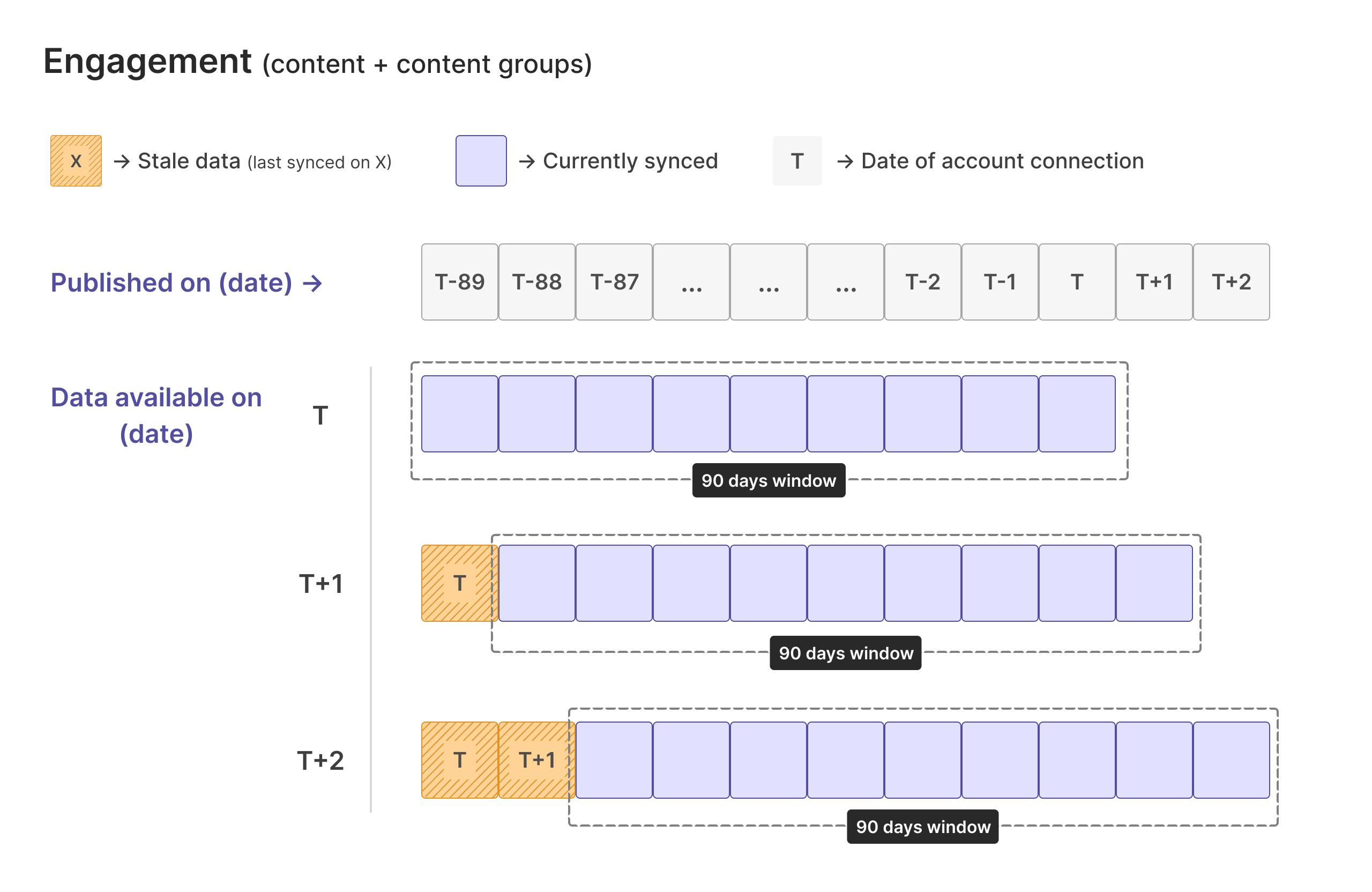
These default periods work on a rolling window basis. For example, for an account connected on 10 Oct 2022, we would fetch data for the content published within previous 90 days, that is content published on or after 12 July 2022. On the next day, 11 Oct 2022, we would fetch data for the content published on or after 13 July 2022. Although the content items synced for the previous day 12 July 2022 would be available in our system, we would not refresh the engagement stats for them.
On-demand data refresh
To run an on-demand refresh, use any of our "refresh" endpoints (such as refresh a profile) and listen to webhooks for the updated information.
To fetch data outside the regular refresh schedule, use InsightIQ’s on-demand refresh APIs.
Use case of On-Demand Refresh:
Creator-Requested Updates: Allow creators to fetch the latest data without waiting for the next scheduled update. This can also be offered as a premium, monetized feature on your end.
Scheduled Jobs: Run periodic updates (e.g., weekly, fortnightly, or custom intervals) to keep specific data points current.
How It Works:
Each product has its own refresh API endpoint, letting you update only the data points you need.
The refresh process is asynchronous and you’ll receive a webhook notification when the update is complete.
On-demand refresh uses the same data refresh periods as the standard refresh policy.
This flexibility ensures you can keep critical data up-to-date while tailoring the refresh schedule to your specific requirements.
Historical data refresh
To run a historical refresh, you can use any of our "fetch historic" endpoints (such as fetch historic content items) and listen to webhooks for the updated information.
To fetch data beyond the standard refresh period, use InsightIQ’s historical refresh APIs.
Use case of Historical Refresh:
Extended Data Retrieval: Collect data starting from a specific historical date for a given product and account.
Use Case-Specific Needs: Ideal for scenarios requiring older content or income data beyond the default refresh window.
How It Works:
Specify a start date to fetch data for items created or published on or after that date.
The process is asynchronous, and you’ll be notified via webhooks when the data collection is finished.
Key Considerations:
No Retroactive Metrics: Historical refresh gathers items starting from the specified date but cannot retrieve point-in-time metrics (e.g., follower counts from that date).
Product Availability: Only available for certain products, such as engagement and income. Identity data does not support historical refresh as it lacks historical context.
One-Time Action: This process does not alter the default refresh schedule. For example, requesting 6 months of historical content data fetches it once, but regular updates continue following the T-90 schedule.
Historical refresh provides a flexible way to retrieve data outside standard periods, tailored to your specific requirements.